Learn · Stage 2: Learn the platform · guide 6 of 6
How to place a practice trade with a stop loss (demo account)
Do this on a demo account only. The goal is to learn the buttons and build one habit: no trade without a stop loss.
Open the order window: click New Order on the toolbar, or press F9.
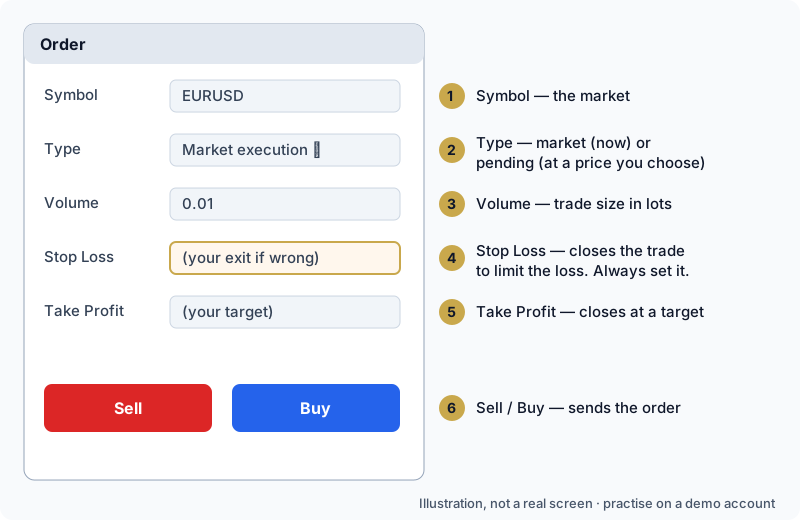
- Symbol — the market you are trading.
- Type — a market order trades now at the current price; a pending order waits for a price you choose (a limit order at a better price than now, a stop order at a worse one).
- Volume — the size of the trade in lots. Bigger volume means each move is worth more money, in both directions. On a demo, practise with the smallest size.
- Stop Loss — the price that closes the trade automatically if the market moves against you. It limits what one trade can cost. Set it before you send the order.
- Take Profit — the price that closes the trade at your target.
- Sell / Buy — sends the order.
After the order: your trade appears in the Trade tab at the bottom, with its profit or loss changing live.
- To change the stop loss or take profit: right-click the trade → Modify.
- To close it yourself: right-click the trade → Close.
- Closed trades appear under History (MT5) or Account History (MT4).
Write one line in a journal after each practice trade: why you opened it, what happened and what you learned. The point is practising the process, not making demo money.
Common problems and fixes:
- "No connection" at the bottom right — check your internet, then log in again with the right server.
- "Invalid account" — wrong login, password or server; check demo vs live server.
- A market is missing — Market Watch → Symbols → Show.
- The chart isn't moving or "Trade disabled" — the market may be closed (weekend, holiday) or the demo account may have expired.
- When something goes wrong, the Journal tab usually says why in plain words.
Official help: placing orders, stop loss and take profit in MT5 (opens in a new tab) and order types (opens in a new tab).
Practising on demo does not promise real results: real trading adds costs, emotions and sometimes slower fills. Read What is a stop loss and Trading costs, leverage and margin before you ever trade real money.
Continue in the course: the Foundation Course — start free, 14 days, no card
Trading involves significant risk of loss. Practise on a demo account first. Holy Trading Science provides education, not financial advice.